how to publish watchOS only apps to app store connect from xcode
Straight to the answer
To publish a Watch only app which uses HealthKit you not only need a plist file in your watchOS App project, you need one in the root of the Xcode solution.
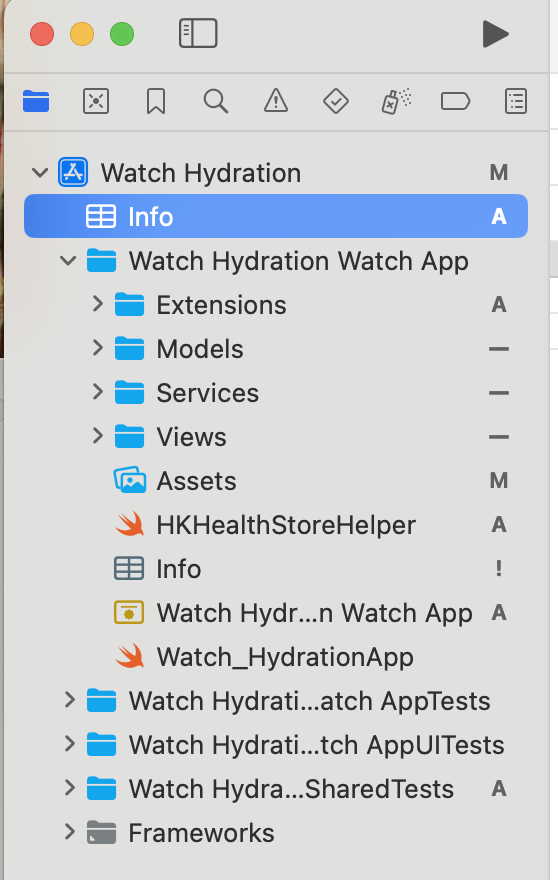
Once you’ve done this, make sure the Target Membership for all plist files in your solution are set to empty. If you don’t do this, your build will start failing.
The rest of the post
I’ve published an App on the App Store! My first App is called One Big Thing and it’s my take on every developer’s first app being a todo app, with a twist: you only get one todo item per day.
My next app, Watch Hydration, is a watchOS exclusive that allows you to quickly log liquids to HealthKit straight from your watch. It’s currently on TestFlight, pending review.
Both of these apps are free and open source, and if anyone actually uses either of them I’ll be thrilled.
Okay, that said and done, I’m now going to write some words and sentences to attempt to catch search engines. I’m putting this below the answer, you’re welcome.
Xcode won’t publish a Watch only app as it’s asking for a .plist file with permission for NSHealthShareUsageDescription and NSHealthUpdateUsageDescription. I already have a .plist file with requested permissions for NSHealthShareUsageDescription and NSHealthUpdateUsageDescription but Xcode fails to distribute to TestFlight/App Store Connect. “Binary Rejected” it declares, the nerve!
My blog does not host comments. If you want to discuss a post, or say hello, you can hit me up on BlueSky where I'm @ThomasChatting.dev or you can email me at hello (at) thomaschatting (dot) dev.